App controlv0.3.2
expo-mcp-bridge
Your agent uses your app the way it uses a browser — it reads the screen, taps, types, scrolls, takes screenshots and reads logs and network, on the phone in your hand.
<AgentBridge router={router} />Read the docs Claude Code, Antigravity and Cursor see, tap, type and debug your Expo app live on a real phone — then shoot a polished launch video of it.
npx expo install expo-mcp-bridge react-native-view-shotnpx expo-mcp-bridge initFree and open source under MIT · v0.3.2 and v0.1.2
An agent tests a login form on a real phone: it snapshots the screen, types, taps and reads back only what changed.
Welcome back
Log in to continue
Password
Don't have an account? Register
Snapshot, tap, type, scroll, screenshot and read logs — then record, direct, pop out, add sound and export an MP4.
Your agent uses your app the way it uses a browser — it reads the screen, taps, types, scrolls, takes screenshots and reads logs and network, on the phone in your hand.
<AgentBridge router={router} />Read the docs Ask for a launch video, get a launch video. Real footage, motion graphics, pop-outs and sound — tweaked in a studio by typing, exported as 1080p MP4.
“make a 30 second launch video”Built on expo-mcp-bridge — installed with it as a dependency, so one server does app control and video.
Read the docsYour agent snapshots the visible screen, acts by reference and reads back only what changed — new text, errors and failed requests included. It checks its own work.
you › test the login form with an empty password

agent › app_snapshot
        input "Email" [e3] · input "Password" [e4] · button "Log In" [e7]
agent › app_batch  type e3 "sam@demo.dev" → tap e7
        + text "Please enter your password."

agent › Login blocks an empty password with a clear message.
        No network call was made, no JS errors.

you › now make a 30 second launch video of the app

agent › video_record × 6 takes · video_plan → 5 scenes · video_studio
Studio open at http://localhost:8790 — export is 1080p MP4.import { Stack, router } from 'expo-router';
import { AgentBridge } from 'expo-mcp-bridge';
export default function RootLayout() {
return (
<>
<Stack />
<AgentBridge router={router} />
</>
);
}{
"mcpServers": {
"expo-app": { "command": "npx", "args": ["expo-mcp-bridge"] }
}
}Add the package and run init — it writes your agent's MCP config and skill.
Drop <AgentBridge /> into your root layout and open the app on your phone.
“Test the signup form.” “Make a launch video.” Your agent takes it from there.
Your agent records the real app on your phone, picks the best takes, writes the copy and cuts it — intro, pop-outs, side-by-side panels, outro.
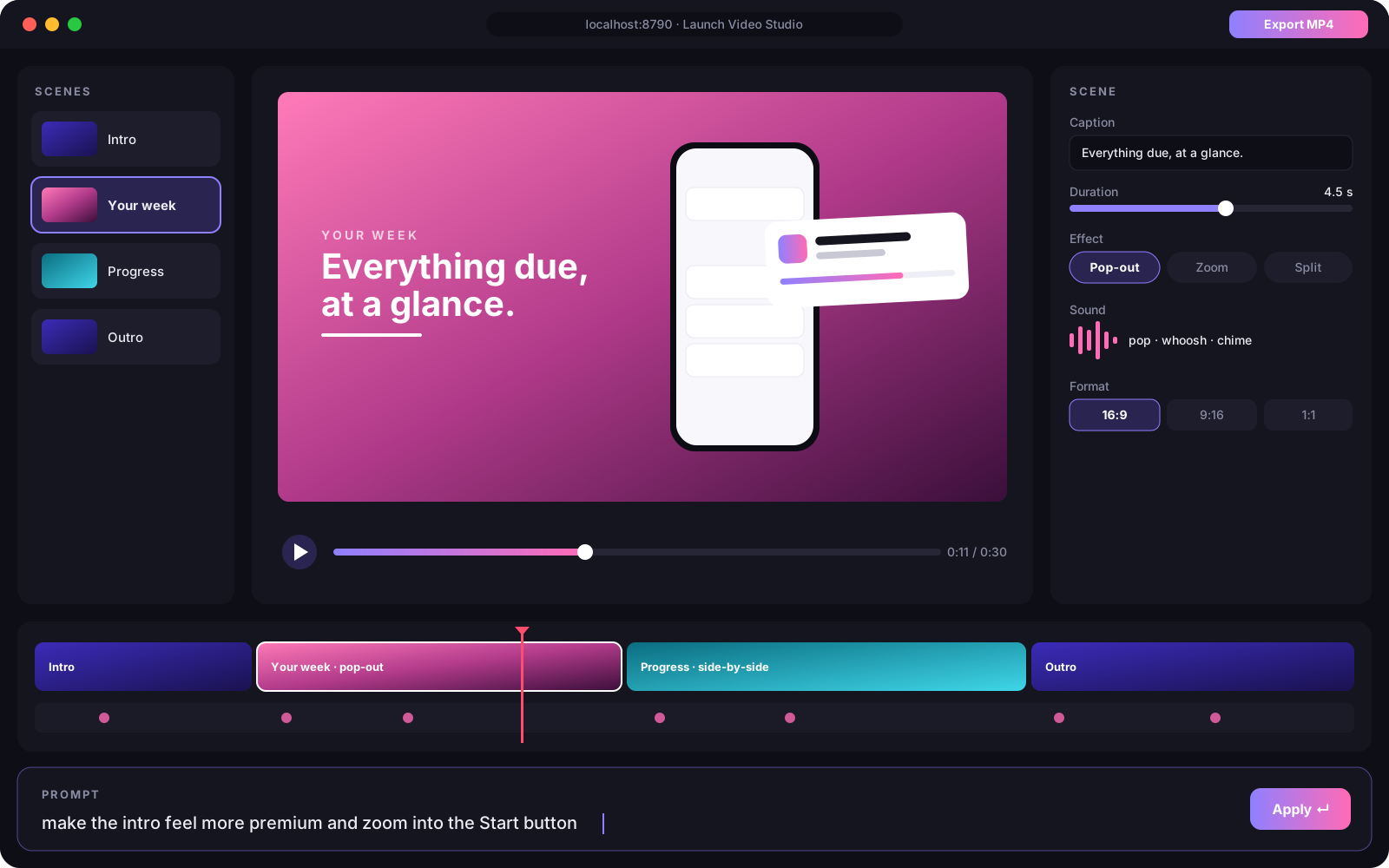
A browser editor with live preview, a timeline and a scene inspector. Simple edits apply instantly; anything else goes to your agent, which edits the video live.
Yes. Both libraries are pure JavaScript in your app; screenshots use react-native-view-shot, which ships with Expo Go. In a custom dev build, rebuild once after installing it.
Any MCP client: Claude Code, Antigravity, Cursor, Windsurf, Cline and more. `init` writes the config for Claude Code and an AGENTS.md guide that other agents read.
No. <AgentBridge /> only runs in development (__DEV__) and only connects to your own computer.
No. The skills tell agents never to enter real passwords, payment or ID details — you type real credentials on the phone yourself.
Nothing. Both libraries are MIT-licensed and free. Studio edits by Claude are optional and use your own Anthropic credentials if you set them.
Both libraries are MIT-licensed. Star them on GitHub, file issues, send pull requests.